


Available Upgrade Paths for Apogee P2
Apogee systems communicate on proprietary protocols, P2 and P1, which means that when the time comes for you to upgrade your Apogee system, it is not as straight forward as it is with systems that communicate on BACnet, which is an open protocol. If you have legacy Apogee system, you probably know this already.
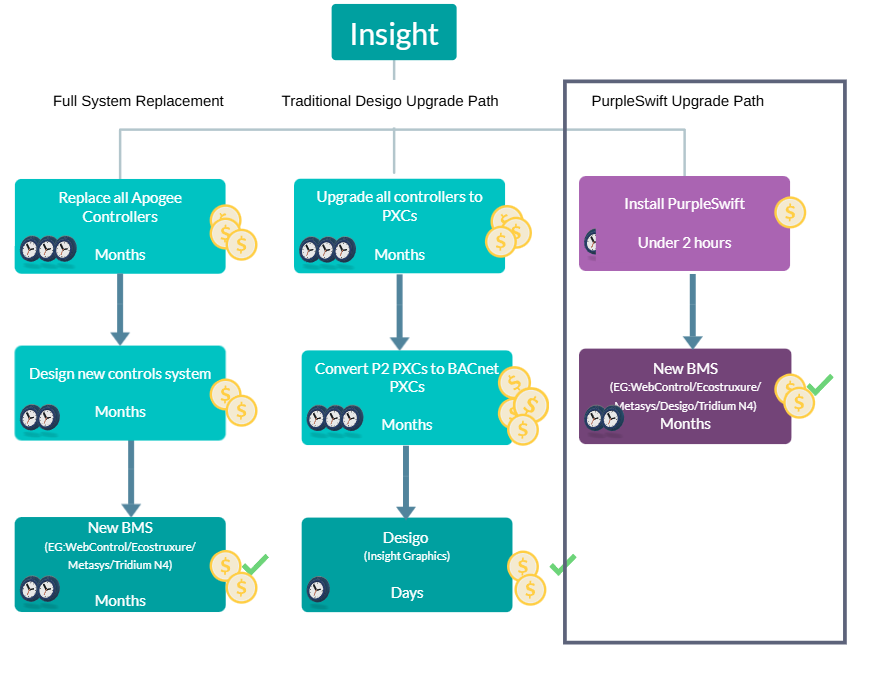
You have most likely been offered one of the following upgrade paths, to allow you to have a new BMS. 1) The Full System Replacement, 2) The Traditional Desigo CC Upgrade Path and 3) The PurpleSwift Upgrade Path. Each has its advantages and disadvantages, and each case needs to be evaluated to see which fits best.
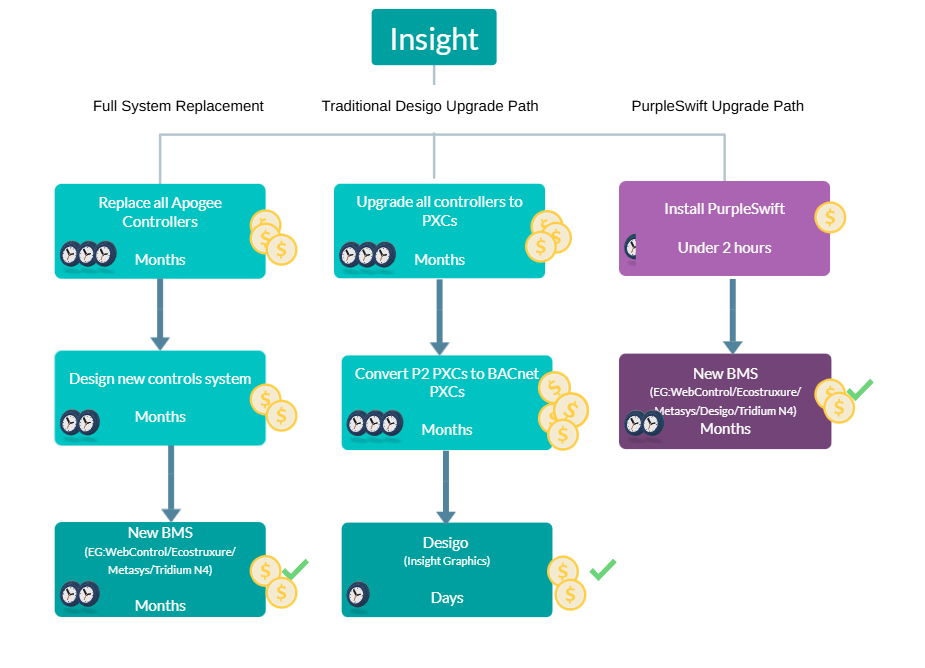
1) The Full System Replacement
This is when all existing Apogee hardware is replaced, regardless of how it is functioning, and a new BMS is installed. This allows access to modern controls, a new modern BMS and new graphics. In some cases, as a cost saving measure, a P1 gateway is used to allow the P1 TECs to be retained and integrated into the new BMS.
Apogee controls are often more than 30 years old, and therefore upgrading these controls allows the users to benefit from modern technology advances such as energy efficiency and other enhancements. The new controls and BMS provided may be BACnet compatible, meaning the system is no longer limited the same upgrading constraints as the Apogee system. And the data is accessible for analytics.
Traditionally, this was the only alternative to upgrading with Siemens.
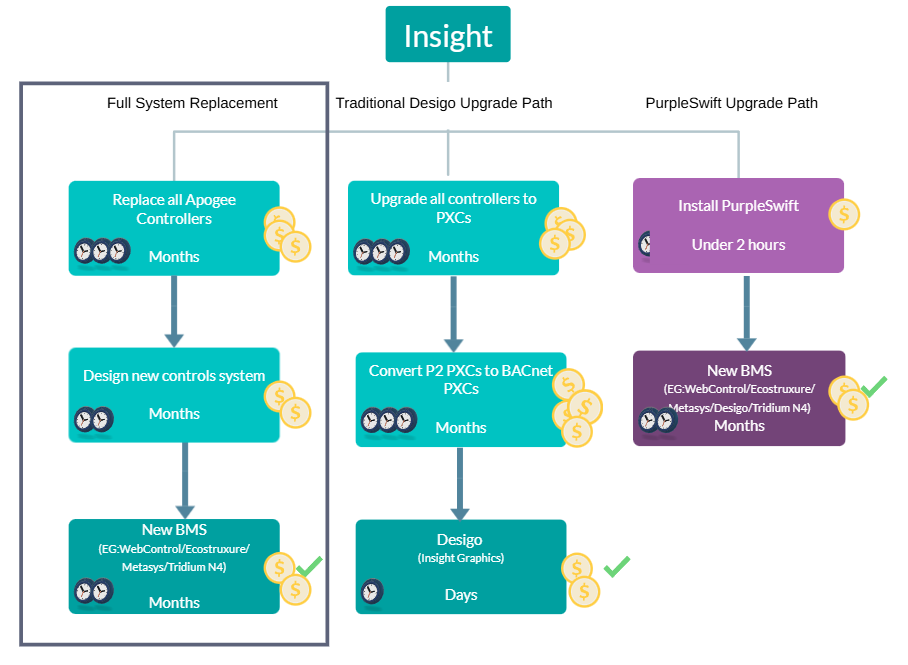
Steps Involved
Step 1 is to replace all hardware. This has significant costs and is associated with a) significant time, and b) downtime. Parts of the system need to come offline as the pieces of hardware are replaced.
Step 2 is to design and configure the new controls system from scratch – this too has an associated cost and timeframe; however it is generally less than Step 1.
Step 3 is implementing the new BMS. The new GUI (Graphical User Interface) is created and the site is commissioned. The time associated with this is generally a few months, and the cost is the price of licencing the new BMS.
Advantages
|
Disadvantages
|
Who SHOULD do this
- If all of your hardware is failing and needs replacing, this is most likely the most cost-effective option. However, you may still want to replace the equipment in phases, in which case option 3 is better.
- If you have mostly or all system 600 controllers. Pre Apogee panels are not supported by Desigo or BACnetP2.
- If you do not have access to Insight/Datamate Advanced or Desigo. The Existing GUI is essential to understanding how the Apogee is designed to be used.
Who should NOT do this
- If you have time constraints/targets to meet for upgrading
- If you have budget constraints
- If you have any functioning equipment that you want to retain
2) The Traditional Desigo CC Upgrade Path
Desigo CC is the new BMS offered by Siemens. This is the path traditionally offered as the upgrade path from Apogee to Desigo CC. What this involves is upgrading all of the older panels to PXCs so that they can be configured to BACnet, and then Desigo CC is installed.
This offers some of the same benefits as the Full System Replacement in that it provides modern controls and the associated benefits, and it provides a new BMS, and the data is also available for analytics. However, for analytics applications there is a limit on the number of points that Desigo can expose to BACnet – which for big sites means that multiple instances of Desigo may be required.
Desigo CC has a function that allows the old Insight graphics and data to be imported which means that Desigo CC does not require a new GUI (Graphical User Interface) which represents a significant time and expense saving. However, the time and cost associated with the other steps is VERY significant.
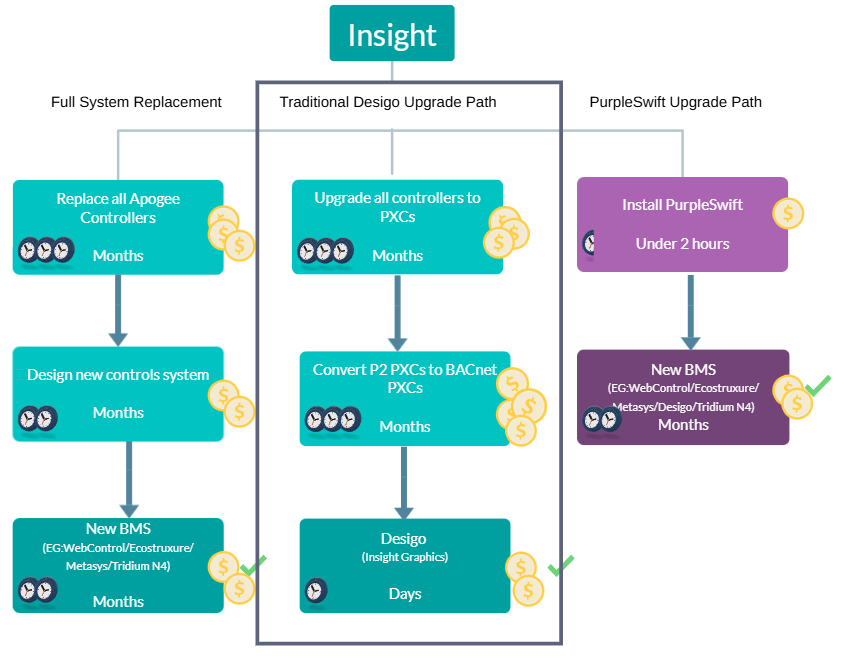
Steps Involved
Step 1 is to upgrade all older panels to PXCs. This means all MBCs, FLNCs and MECs need to be replaced. This has significant costs and is associated with a) significant time, and b) downtime. Parts of the system need to come offline as the pieces of hardware are replaced.
Depending on the size of the site and the budget available, Step 1 can take from months to years.
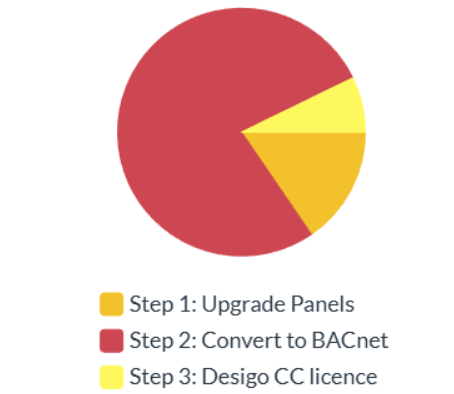
Step 2 is to convert all P2 PXCs to BACnet PXCs. This is involves 2 parts. 1st the PXC firmware is flash upgraded to BACnet and then the PXC programming is re-engineered for BACnet. This takes up significant time (months) and can make up about 75% of the cost of the entire upgrade. And these cost are avoidable. Unlike replacing the hardware, which is not always necessary but does add value, Step 2 is only providing access to the P2 system. If you replace Step 2 with our gateway, you can cut out up to 75% of the cost of your Desigo CC upgrade.
|
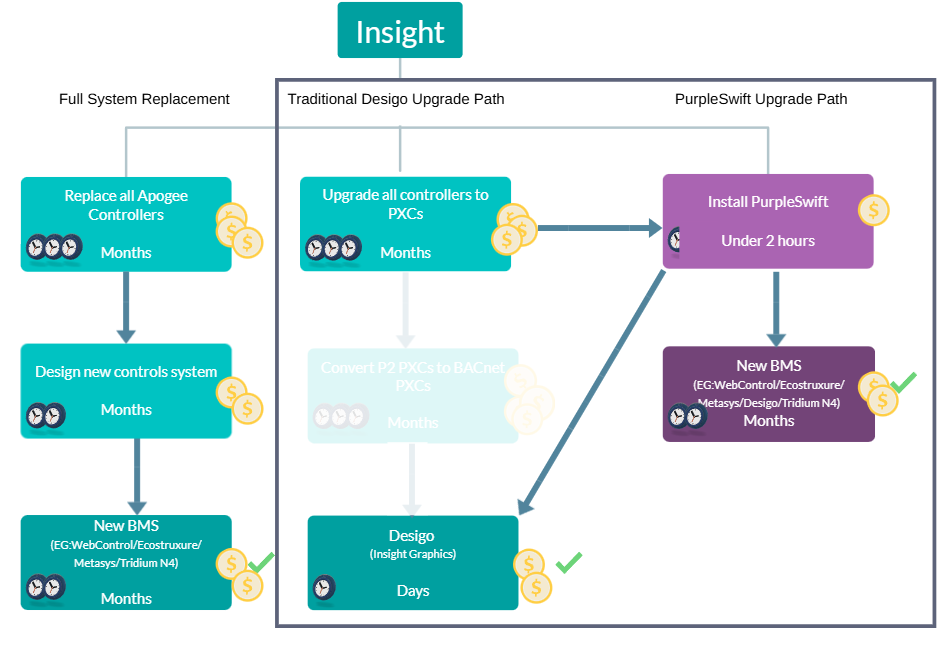
Step 3 is configuring and commissioning Desigo. As mentioned, this has much less time associated with it due to the Insight GUI being cloned onto the Desigo system. The cost associated is about the same as licencing any other modern BMS.
Advantages
|
Disadvantages/Limitations
|
Who SHOULD do this
|
Who should NOT do this
|
3) The PurpleSwift Upgrade Path
This path offers the quickest and most affordable path to a new BACnet compatible BMS. We offer full read/write access to the P2 system data, allowing for a new BMS/analytics platform to be implemented.
Our software acts as a gateway between the P2 system and BACnet, meaning that you do not have to replace any functioning hardware in order to upgrade your BMS, and your PXCs do not need to be configured to BACnet.
Our gateway automatically maps the system, so integration takes about 20 minutes per Building Level Network. And the system can stay online the whole time. The only downtime would be if you would like to replace some of the existing panels because they are failing.
If you’re committed to Desigo CC, BACnetP2 still makes sense — it enables a Desigo CC upgrade while eliminating much of the cost and delay usually involved.
|
Steps InvolvedStep 1 is to install our gateway – this takes under 2 hours on average, and the associated cost is minimal compared to the other options. Step 2 is to duplicate the Insight GUI onto the new BMS – this generally takes a few months but is quicker than designing the system from scratch (as with a Full System Replacement). There is also the cost of licencing the new BMS to consider. Advantages
|
Disadvantages/Limitations
- Does not integrate with system 600. Pre Apogee panels are not supported by Desigo or BACnetP2. These panels will need replacing.
- If your system has older panels such as MBCs, FLNCs or MECs, you will still have “old” hardware which may require replacing.
Who SHOULD do this
- Everyone who has an Apogee system! Just kidding (kind of).
- If you want to take a phased approach
- If you want to retain all of your hardware for as long as possible
- If you have time constraints/targets to meet for upgrading
- If you have budget constraints
- If you want a new service provider
Who should NOT do this
- If you have mostly or all system 600 controllers
- If you do not have access to Insight or Desigo – aside from not being able to provide us with the proper reports the existing GUI is essential to understanding how the Apogee is designed to be used.